Live Demo Store Like this extension? Buy now on flexext.dev for $49 (Instant Download & Free Support)
$100.00
Ex Tax: $100.00
Best Price & Quality Guarantee
Featured Product Apple

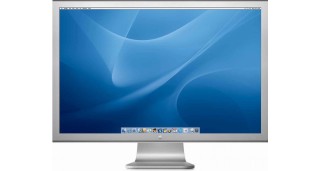
Apple Cinema 30"

Product Code: Product 15 • Availability: In Stock • Reward Points: 100

Product Mobile QR Code
QR Code Studio Pro
Scan to View & Buy on Mobile

Open your smartphone camera to instantly access specifications, active discounts, and 1-click mobile checkout.

Key Highlights & Features
Premium Quality Guaranteed
Fast & Secure Delivery
100% Encrypted Checkout
24/7 Dedicated Support

The 30-inch Apple Cinema HD Display delivers an amazing 2560 x 1600 pixel resolution. Designed specifically for the creative professional, this display provides more space for easier access to all the tools and palettes needed to edit, format and composite your work. Combine this display with a Mac Pro, MacBook Pro, or PowerMac G5 and there's no limit to what you can achieve.

The Cinema HD features an active-matrix liquid crystal display that produces flicker-free images that deliver twice the brightness, twice the sharpness and twice the contrast ratio of a typical CRT display. Unlike other flat panels, it's designed with a pure digital interface to deliver distortion-free images that never need adjusting. With over 4 million digital pixels, the display is uniquely suited for scientific and technical applications such as visualizing molecular structures or analyzing geological data.

Processor
Clockspeed100mhz
Display Architecture & Hardware Specifications
Apple Certified Hardware
Panel Technology 30-inch TFT Active-Matrix Liquid Crystal Display (IPS LCD)
Native Resolution 2560 x 1600 pixels (16:10 wide aspect ratio, 2K QHD+)
Viewing Angle 178° horizontal / 178° vertical wide viewing angle
Pixel Response Time 14 ms (typical gray-to-gray)
Color Palette & Depth 16.7 million colors (True 24-bit sRGB color accuracy)
Integrated I/O Hub 2x High-Speed USB 2.0 ports, 2x FireWire 400 ports
Video Interface Dual-Link DVI connector with digital HDCP support
Download Datasheet (PDF) Energy Star & TCO 2026 Compliant
Installation & Setup Guide
Quick Start
Step-by-Step Setup:
  1. Connect the heavy-duty Dual-Link DVI cable to your graphics card port.
  2. Plug the integrated USB and FireWire cables into your workstation to activate peripheral hubs.
  3. Connect the 150W external power adapter to a surge-protected AC outlet.
  4. Use operating system display settings to select native 2560 x 1600 resolution at 60 Hz.
FlexExt 3-Year Warranty

Every purchase includes 36 months of replacement protection and priority technical support.

To achieve full native 2560x1600 resolution, your graphics adapter must support Dual-Link DVI. Standard Single-Link DVI is limited to 1920x1200. Modern systems with DisplayPort or Thunderbolt / USB-C require an Active Dual-Link DVI adapter with supplementary USB power.

Our custom Option Character Limit module enforces a minimum of 3 and maximum of 25 characters on personalized orders. As you type in the engraving input field, an interactive badge dynamically updates remaining characters and prevents submitting invalid lengths.

Yes! The Single Quantity Enforcer locks quantity to 1 unit per order. If you click Add to Cart or attempt to increase the quantity in cart, our enforcer guard ensures fair purchasing policies for promotional equipment.

Yes, our FlexExt Product FAQ module automatically injects Schema.org JSON-LD FAQPage structured data into the page header, making questions and answers eligible for expandable rich search results on Google.

Be the first to write a review for this product.

Write a review

Note: HTML is not translated!
Bad           Good

Available Options